Remote vs WhatsApp security
Why Sovereign Remote is the strongest privacy path, and why WhatsApp should stay a low-sensitivity backup.
Your primary interface is Sovereign Remote on iPhone 15 or newer. WhatsApp is a convenient backup channel — not the desk. Understanding the security difference helps you keep the highest level of privacy and control.
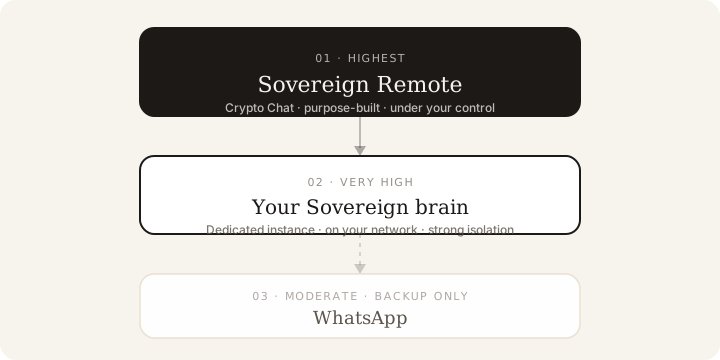
Security hierarchy
| Layer | Security level | Why |
|---|---|---|
| Sovereign Remote | Highest | Purpose-built Crypto Chat, encrypted, under your direct control |
| Your Sovereign brain | Very high | Dedicated appliance on your network with strong isolation |
| WhatsApp (backup) | Moderate | Third-party platform with a broader attack surface |
Sovereign Remote is always the most secure part of your system. WhatsApp, while useful, is the most vulnerable component in this combination.
Why Sovereign Remote is more secure
Sovereign Remote is built for private interaction with your Sovereign:
- Crypto Chat — end-to-end encrypted conversation between the app and your Sovereign brain on your network (How Crypto Chat is protected)
- No third-party messaging infrastructure required for core work
- Direct connection to your Sovereign — less exposure than routing through a consumer chat network
- You control what is shared, and when
- Purpose-built security model, not a general-purpose messenger
Because the app exists only for Centurion owners, it avoids many risks that come with mass-market messaging platforms.
Why WhatsApp is the weakest link
WhatsApp is fine as a backup, but it introduces real considerations:
- It is a third-party platform with its own infrastructure and policies
- Messages pass through WhatsApp’s servers (even with end-to-end encryption for content)
- Broader attack surface — large user base, frequent phishing and social engineering
- Metadata (who you talk to and when) is visible to WhatsApp
- Media and files follow WhatsApp’s retention rules
Use WhatsApp for lightweight, non-sensitive messages only. Keep confidential work inside Sovereign Remote.
How your data is handled
Your Sovereign is built as a private system, not a shared public AI:
- Your data stays under your control and is not used to train general models
- Conversations and outputs stay with your dedicated Sovereign brain
- The Remote app does not keep a full history on your phone — see Where your data lives
- Sensitive exchanges belong on Crypto Chat and your brain — not in a backup messenger
- You decide what, if anything, is shared into WhatsApp
For the wider picture, see Privacy & Trust overview.
Best practices
- Make Sovereign Remote your default interface.
- Reserve WhatsApp for quick, low-sensitivity messages.
- Do not share highly confidential material through WhatsApp.
- Keep Sovereign Remote and iOS updated.
- Use strong device security — passcode, biometrics, and a current operating system.
Channel roles are also covered in Backup communication with your Sovereign.
Summary
| Component | Recommendation | Reason |
|---|---|---|
| Sovereign Remote | Primary interface | Most secure and purpose-built |
| Your Sovereign brain | Core system | High isolation and control on your network |
| Backup only — use sparingly | Most exposed part of the setup |
Your Sovereign, reached through Sovereign Remote, offers stronger privacy than routing everything through a consumer messaging platform. WhatsApp is a useful backup — and still the weakest link in the chain.
Was this article helpful?